
You design a 3D model. Your printer drops messy plastic strings in mid-air. This ruins parts and wastes time. The fix requires understanding gravity and smart support structures1.
3D printers cannot print floating layers2. Molten plastic needs a solid surface below it. Without support, gravity pulls the hot material down. You must use support structures, bridge settings, or change your part design to fix this physical limit.
I see this exact problem often in our CHENcan factory. Let us look at why this happens. We will show you how to stop it from ruining your next big project.
What Does “Floating Layers” Mean in 3D Printing?
You hear the term floating layers. You feel confused. Ignoring this concept leads to failed prints. We need to define exactly what it means first.
A floating layer is any part of a 3D model that prints in mid-air. It has no material underneath it. The material falls. It is a physical limit. It is not a machine defect.
The Reality of Mid-Air Extrusion
Many engineers ask me about floating layers. They want to know if our CHENcan industrial 3D printers3 can print them. I always tell them the truth. Floating layers are a physical limit. They are not a machine defect. We use large-scale industrial 3D printers4 with pellet materials. The extruder pushes out hot plastic. This plastic must land on something solid. It falls if it lands on nothing. Gravity always wins.
How Size Changes the Problem
Large-scale printing requires engineering design thinking. A failed floating layer on a small toy is just annoying. A failed layer on a large automotive prototype wastes kilos of material. It also wastes days of machine time.
| Feature | Small 3D Printing | Large Industrial 3D Printing |
|---|---|---|
| Material Cost | Low | Very High |
| Time Lost | Minutes to Hours | Days |
| Solution Focus | Auto-generated supports | Engineering design thinking |
You cannot blame the machine. The true solution comes from understanding the physics of your material. You must design the part correctly from the start.
How Do FDM 3D Printers Actually Build Parts Layer by Layer?
You might not know how the printer stacks material. This lack of knowledge causes bad designs. Let us look at the basic printing process.
FDM 3D printers5 melt plastic wire or pellets. The machine squeezes the material through a hot nozzle. The machine draws a flat shape. The plastic cools and gets hard. The printer moves up. It draws the next layer on top.
The Stacking Process
I often explain this process to new clients. They buy our industrial 3D printers. The machine must build parts from the bottom to the top. Every new layer relies completely on the layer below it. The hot nozzle acts like a hot glue gun. It traces a path. It leaves melted plastic. It moves on.
The Cooling Factor
The plastic is very soft when it leaves the nozzle. It takes time to cool down. It takes time to become a solid structure. The soft plastic has nowhere to rest if the layer below is missing.
| Printing Step | Action | State of Plastic |
|---|---|---|
| 1 | Extruder heats material | Liquid or Soft |
| 2 | Nozzle places material | Soft but shaping |
| 3 | Fans blow air | Cooling |
| 4 | Printer moves up | Solid |
We use heavy pellet extruders in our CHENcan factory. These extruders push out a lot of material very fast. This makes the cooling process very critical. You must provide a solid base for every single layer.
What Is the Real Reason Floating Layers Fail: Gravity vs. Molten Plastic6?
You see your print droop and fail. You think the machine is broken. The real enemy is simply gravity pulling down on soft plastic.
Floating layers fail due to gravity. Gravity pulls the molten plastic down before it can cool. The hot plastic acts like a thick liquid. The liquid falls toward the print bed without a solid layer underneath it.
The Physics of Melted Plastic
Gravity is a constant force. We test our large 3D printers at our Jinan and Suqian bases. We see this physics rule clearly. The plastic leaves the nozzle at very high temperatures. It has no structural strength at this heat. It cannot hold itself up in the air.
Viscosity and Weight
Different materials act differently. Gravity affects them all. You print large parts. The plastic lines are thick and heavy. The heavier the plastic line, the faster it falls.
| Material State | Impact of Gravity | Result in Mid-Air |
|---|---|---|
| Cold solid plastic | Very low | Holds shape |
| Warm soft plastic | Medium | Droops down |
| Hot melted plastic | High | Falls completely |
You cannot turn off gravity. You must control the process. Mature solutions come from a mix of design optimization and process control. You must manage the heat. You must manage the cooling fans. You must manage the speed of the print head. This fights gravity effectively.
Are Overhangs and Bridges Different Kinds of Floating Geometry?
You might treat all unsupported parts the same way. This causes you to use too much support material. Overhangs and bridges are actually very different.
Yes, they are different. A bridge connects two solid points in the air. The printer stretches plastic tightly across the gap. An overhang sticks out into the air. It only connects to the model on one side. Overhangs are harder to print.
Understanding Bridges
I see many customers confuse these two terms. A bridge is like a real bridge over a river. The printer anchors the hot plastic on one side. It pulls the plastic across the empty space. It anchors the plastic on the other side. The plastic is pulled tight. It cools in a straight line.
Understanding Overhangs
An overhang is like a diving board. It only connects to the main body on one end. The other end points into empty space. The printer pushes plastic out to the empty end. There is nothing to pull it tight.
| Geometry Type | Connection Points | Difficulty to Print |
|---|---|---|
| Bridge | Two | Medium |
| Overhang | One | High |
We build custom CNC solutions and 3D printers. We teach our clients this difference. You can print long bridges without support. You just tune your cooling fans. You almost always need support or design changes for long overhangs.
How Does the 45-Degree Rule Explain Why Angle Matters in 3D Printing?
You try to print an angled wall. It looks terrible. Guessing the right angle leads to bad prints. The 45-degree rule is your starting guide.
The 45-degree rule is simple. A 3D printer can safely print overhangs at an angle of 45 degrees or less. Each new layer rests on at least half of the previous layer. This gives it enough support to stay up.
The 45-Degree Guideline
Every beginner learns the 45-degree rule. You can build walls that tilt outward. The tilt must not be too flat. Each new line of plastic steps out slightly. It still holds onto the line below it.
The True Limits of Angles
I must share my insight here. The 45-degree rule is just an empirical value. It is just a basic guess. The real limit depends on your material performance. It depends on your extrusion parameters. We push this limit in our factory.
| Overhang Angle | Standard Printer Result | Optimized CHENcan Printer Result |
|---|---|---|
| 30 Degrees | Perfect | Perfect |
| 45 Degrees | Good | Perfect |
| 60 Degrees | Fails | Good (with high cooling) |
You can use strong cooling fans. You can print slowly. You can use the right plastic. You can print overhangs up to 60 degrees this way. You must test your specific machine and material. Do not blindly trust the 45-degree rule.
What Are the Common Failures Caused by Unsupported Layers?
You start a long print and walk away. Later, you find a disaster. Knowing what failures look like helps you fix the root cause faster.
Common failures include spaghetti printing. Plastic strings go everywhere. You might see drooping loops on the bottom of overhangs. Sometimes, the entire part breaks off the bed. The nozzle hits the messy plastic that failed to lay down flat.
The Spaghetti Monster
I have 27 years of experience in this industry. I have seen many ruined parts. The most famous failure is the spaghetti monster. The printer tries to print in mid-air. The plastic falls. The machine keeps moving. It keeps pushing plastic. Soon, your print bed is covered in tangled strings.
Curling and Warping
Another common failure is curling. An unsupported edge cools down. It shrinks. Nothing holds it down. The edge curls up toward the nozzle. The nozzle comes back for the next layer. It crashes into the hard plastic.
| Failure Type | Visual Sign | Main Cause |
|---|---|---|
| Spaghetti | Tangled plastic strings | Complete lack of support |
| Drooping | Ugly loops hanging down | Poor cooling on overhangs |
| Nozzle Crash | Part knocked off bed | Curled edges on floating parts |
These failures cost a lot of money. This is true in large-scale industrial 3D printing. A nozzle crash can damage the machine. You must prevent these issues before you press the start button.
How Do Support Structures Solve Floating Geometry for 3D Printers?
You have a complex model. It must have floating parts. Printing it directly will fail. Support structures act as temporary scaffolding to hold your part up.
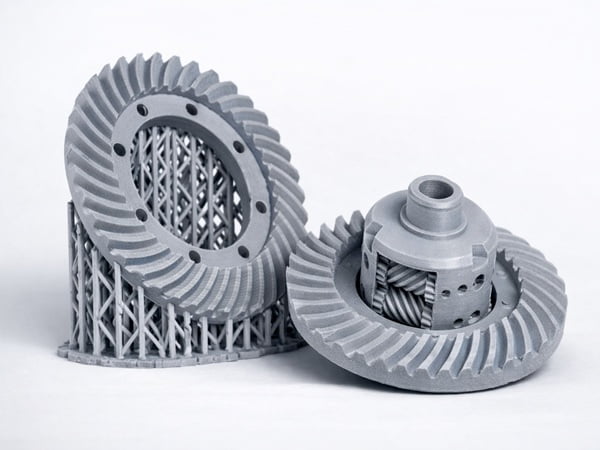
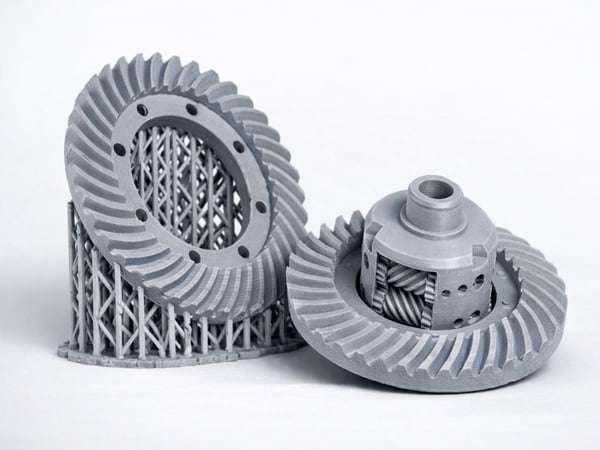
Support structures are extra towers of plastic. They are printed underneath the floating parts of your model. They provide a solid base for the mid-air layers. You break these temporary towers away after the print is finished.
Temporary Scaffolding
Support structures are a very common tool. They act just like scaffolding. Builders use scaffolding to make a real house. The 3D printer software calculates where the plastic will fall. It builds thin walls under those areas.
The Cost of Supports
Supports solve the gravity problem. They bring new problems. They use extra material. They make the print time much longer. They leave ugly marks on the surface of your final part. You have to remove them later.
| Support Type | Pros | Cons |
|---|---|---|
| Tree Supports | Saves material | Can be unstable for heavy parts |
| Grid Supports | Very strong | Hard to remove and wastes material |
| Soluble Supports | Perfect surface finish | Needs two nozzles and expensive material |
Our clients print large sculptures. They print wind turbine blade molds. Using supports wastes too much time and money for them. Supports are useful. They should not be your only strategy. Relying only on supports is a lazy way to print.
How Can You Reduce or Eliminate Supports with Smart Slicer Settings7?
You want to save time and plastic. Using default settings wastes both. Smart slicer settings can help you print better overhangs with fewer supports.
You can reduce supports easily. You lower the print speed. You turn the cooling fans to maximum power. This freezes the plastic in mid-air faster. You adjust the bridge flow rate. You change the layer height to make unsupported layers stronger.
Tuning the Software
The slicing software is the brain of your 3D printer. You can change the process control settings to fight gravity. I always tell our engineers to focus on cooling. You blow cold air on the hot plastic. You do this the exact moment it leaves the nozzle. It becomes hard instantly.
Layer Height and Line Width
You can change the layer height. Thinner layers mean less plastic sticks out over the edge. This makes steep overhangs easier to print.
| Slicer Setting | Adjustment | Effect on Overhangs |
|---|---|---|
| Print Speed | Decrease | Gives plastic time to cool |
| Fan Speed | Increase | Freezes plastic faster |
| Layer Height | Decrease | Creates a smoother step |
| Bridge Flow | Decrease | Pulls the plastic string tighter |
Process control is a mature solution. We test these parameters on our CHENcan industrial printers. We often print complex shapes without any supports at all. You just need patience. You must find the perfect settings for your specific material.
Why Is Designing Parts to Avoid Floating Layers Important?
You struggle to print a bad design perfectly. This is a waste of effort. Changing the design before printing is the most powerful solution you have.
Designing parts to avoid floating layers saves material. It cuts print time. It ensures a clean surface finish. You can add chamfers instead of flat overhangs. You can split a complex model into flat parts. You remove the need for supports entirely.
Engineering Design Thinking
This is my most important insight. You print large sculptures. You print industrial structures. Optimizing design is often more important than relying on supports. You should not force a bad design through the printer. You must use engineering design thinking from the very beginning.
Modifying the Geometry
Your part has a flat 90-degree overhang. You change it to a 45-degree chamfer. The machine will print it easily. A part has too many floating arms. You cut the 3D model into two pieces. You print them flat on the bed. You glue them together later.
| Design Strategy | How It Works | Benefit |
|---|---|---|
| Add Chamfers | Replaces flat overhangs with angles | No supports needed |
| Split the Model | Cuts complex shapes into flat pieces | Faster printing |
| Reorient Part | Lays the part on its biggest flat side | Reduces floating areas |
We work with automotive manufacturing clients. We always review their 3D models first. A small design change can save days of printing time. This is very important on our large industrial 3D printers.
Do Other 3D Printing Technologies Allow Floating Layers?
You think all 3D printers have this exact same gravity problem. That is not true. Different printing technologies handle floating geometry in very different ways.
Yes, technologies like SLS and Binder Jetting can print floating layers easily. These machines print inside a box full of powder. The unsintered powder acts as a natural support. You do not need to print extra support structures.

The Powder Bed Advantage
FDM printers push plastic into empty air. Powder bed printers work differently. SLS uses a laser. The laser melts a shape into a flat layer of fine powder. More powder is spread on top. The loose powder stays in the box. This loose powder holds up the next melted layer.
Resin Printing Limitations
SLA printing uses a liquid resin bath. Resin printers still need supports. They often print upside down. The supports hold the part to the build plate. They fight the pulling force of the liquid.
| Technology | Support Material | Needs Printed Supports? |
|---|---|---|
| FDM or Pellet | Extra plastic | Yes |
| SLS (Powder) | Unused powder | No |
| SLA (Resin) | Cured resin | Yes |
SLS does not need supports. However, the machines and materials are very expensive. Pellet extrusion is still the best choice. It is best for large-scale industrial applications like foundry patterns. You just need to master the design and process control.
Conclusion
Floating layers fail due to gravity. By understanding angles, optimizing part designs, and tuning printer settings, you can overcome this physical limit and print perfect industrial parts every time.
Learning about support structures can help you print complex models successfully by providing necessary support for floating layers. ↩
Knowing what floating layers are can prevent failed prints and improve your understanding of 3D printing limitations. ↩
Exploring CHENcan industrial 3D printers can provide insights into large-scale 3D printing solutions and capabilities. ↩
Understanding the differences in large-scale 3D printers can help in choosing the right equipment for industrial applications. ↩
Learning how FDM 3D printers operate can enhance your ability to troubleshoot and optimize your printing process. ↩
Exploring the interaction between gravity and molten plastic can help in designing better support strategies. ↩
Optimizing slicer settings can reduce material usage and print time, leading to more efficient 3D printing. ↩